
Are you struggling to figure out how to check DC voltage using your multimeter? You’re not alone.
Many people find this task intimidating, but it doesn’t have to be. Imagine the peace of mind you’ll feel when you can confidently measure voltage and troubleshoot electrical issues at home or in the workplace. This skill can save you time, money, and a whole lot of frustration.
In this guide, you’ll discover simple, step-by-step instructions that make the process quick and easy, even if you’re new to using a multimeter. Let’s demystify the process and unlock your potential to handle basic electrical tasks with ease. Keep reading to become the master of your multimeter and take control of your electrical projects.

Credit: www.youtube.com
Choosing The Right Multimeter
Choosing the right multimeter is crucial for accurate DC voltage measurement. Multimeters come in various types and offer different features. Selecting the appropriate one can make your task easier and more efficient. Understanding the differences and features will help you make an informed choice.
Digital Vs Analog Multimeters
Digital multimeters are popular for their precision and ease of use. They display readings on a digital screen, making it easy to read. Analog multimeters use a needle to indicate measurements. They might be harder to read but offer a continuous reading display. Digital models often have more features and are user-friendly.
Features To Look For
Consider the range of DC voltage the multimeter can measure. A wide range means more versatile usage. Look for auto-ranging capability. This feature adjusts the range automatically for accuracy. Check for a backlit display. It helps in low-light conditions. Ensure the multimeter has a sturdy build for durability. Safety features like overload protection are essential.
Preparing For Voltage Measurement
To check DC voltage with a multimeter, select the DC voltage setting first. Next, connect the red probe to the positive terminal and the black probe to the negative terminal. Ensure your connections are secure for accurate readings.
Preparing to measure DC voltage with a multimeter is crucial. Start by understanding the essentials. This ensures accuracy and safety. Below are key steps to follow.Safety Precautions
Safety is a top priority. Always check the multimeter’s condition. Ensure there are no visible damages. A damaged multimeter can give incorrect readings. It can also be dangerous. Use insulated tools. This prevents electric shocks. Always wear rubber gloves. They add an extra layer of protection.Gathering Necessary Tools
Get all the tools ready before starting. You need a reliable multimeter. Ensure the multimeter is set to measure DC voltage. Check the battery of the multimeter. A weak battery affects accuracy. You will also need test leads. These should be in good condition. Replace damaged leads immediately. Lastly, have a stable surface. This ensures the multimeter does not fall during use.Setting Up The Multimeter
Setting up a multimeter for DC voltage measurement is straightforward. It’s essential for getting accurate results. Proper setup ensures safety and precision. Follow these steps to prepare your multimeter correctly.
Selecting The Correct Mode
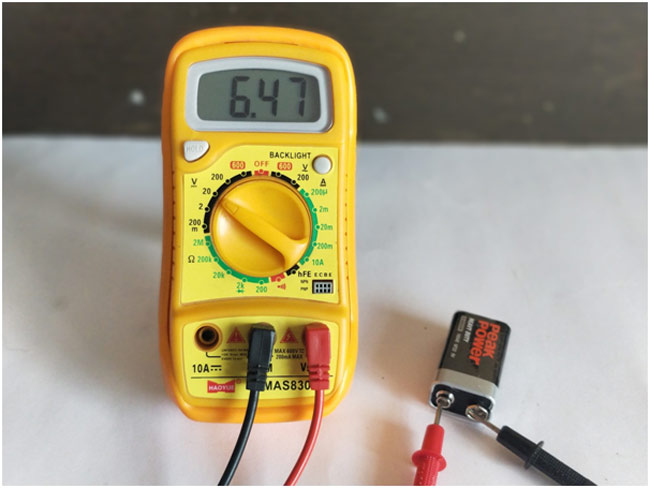
Begin by turning on your multimeter. Locate the dial or button labeled “DC Voltage” or “VDC”. This setting is crucial for measuring direct current voltage. Ensure you don’t select AC voltage by mistake. The multimeter display should confirm your selection with a “DC” icon. This step readies your device for accurate DC readings.
Adjusting The Range
Next, adjust the range to suit your measurement needs. Many multimeters offer automatic ranging. If yours does, it will select the appropriate range for you. For manual multimeters, choose a range higher than the expected voltage. This prevents damage and ensures the accuracy of the reading. If unsure, start with the highest range available. You can then adjust downward if necessary.
Credit: circuitdigest.com
Connecting The Multimeter
Connecting the multimeter is essential for checking DC voltage accurately. Set the multimeter to DC mode, then connect the probes to the appropriate terminals. Ensure correct polarity for a precise reading.
Connecting a multimeter is essential for accurate DC voltage measurements. This process starts with selecting the right probes and ensuring secure connections. Proper handling of these components guarantees reliable results. Here, we explore how to connect your multimeter effectively.Proper Probe Placement
Select the black and red probes. The black probe connects to the COM port. The red probe connects to the VΩmA port. This setup is crucial for measuring DC voltage. Ensure that each probe is firmly inserted. A loose connection can lead to inaccurate readings. Double-check that the probes are in the correct ports. This simple step makes a big difference.Ensuring Secure Connections
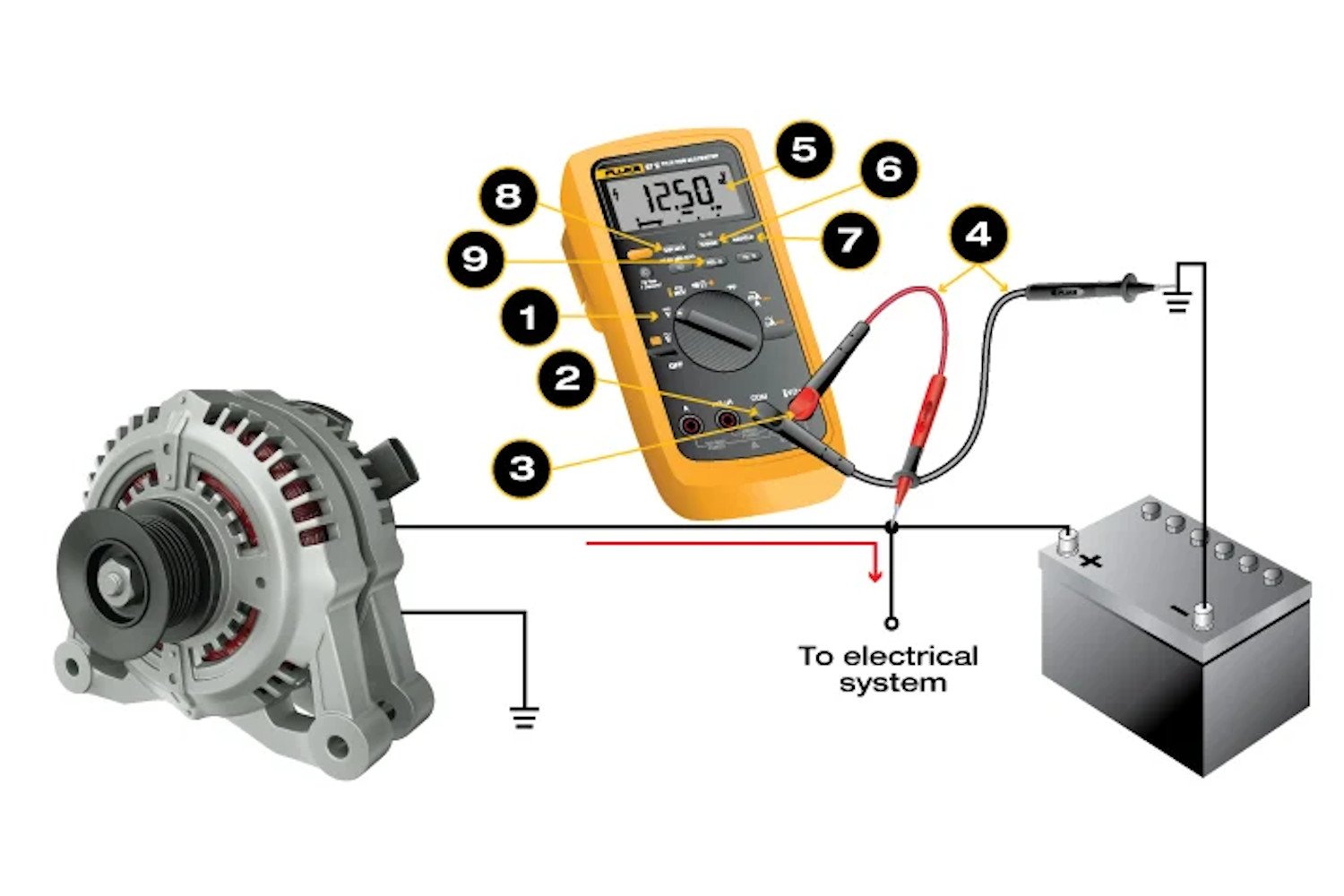
Secure connections prevent errors. Clip the probes to the correct points in the circuit. The black probe usually attaches to the negative terminal. The red probe attaches to the positive terminal. Hold the probes firmly against the connections. A loose grip can cause fluctuations in readings. Make sure the connections are stable. This guarantees consistent and accurate voltage measurements.Reading Dc Voltage
Checking DC voltage with a multimeter is a simple task. It helps you measure the voltage of batteries or other DC sources. You need to know how to read the display. This ensures accurate measurements. Let’s dive into the process of reading DC voltage.
Interpreting The Display
The multimeter display shows numbers and symbols. These represent the voltage level. Ensure the multimeter is set to DC mode. Look for the ‘V’ with straight lines, not wavy ones. The number on the screen is the voltage in volts. If it shows a negative sign, check your connections. The probes might be reversed. Always make sure the probes are connected properly.
Troubleshooting Common Errors
Errors can occur while reading DC voltage. A blank screen means no power or wrong settings. Check the multimeter’s battery or settings. A fluctuating reading indicates loose connections. Ensure the probes are firmly connected. If you see an ‘OL’ sign, the voltage is too high. Adjust the range setting on your multimeter. Double-check your multimeter settings if readings seem off. Proper troubleshooting helps maintain accuracy in measurements.
Tips For Accurate Measurement
To check DC voltage with a multimeter, first, set it to the DC voltage setting. Place the black probe on the negative terminal and the red probe on the positive terminal. Ensure steady contact for an accurate reading. Adjust the range setting if the initial reading is not clear.
When you’re measuring DC voltage with a multimeter, precision is your best friend. Accurate readings can be the difference between a successful electrical project and a frustrating one. To ensure you get the most accurate measurements possible, consider these tips. You’ll be better equipped to troubleshoot and solve electrical issues effectively.Avoiding Interference
Interference can throw off your readings, leading to inaccurate results. Always ensure your multimeter is properly shielded from other electrical devices. The electromagnetic fields they emit can skew your measurements. Keep wires and leads organized and away from each other. Tangled leads can create interference, especially in high-voltage environments. Think of it like untangling a pair of headphones; it might seem trivial, but it makes a world of difference. Are you using your multimeter near fluorescent lights or large motors? They often generate electrical noise that can affect readings. Relocating your workspace to a quieter area can be a simple yet effective solution.Maintaining Calibration
Calibration is crucial for accuracy. A multimeter that isn’t calibrated can lead to incorrect readings, making troubleshooting more challenging. Always check if your multimeter is calibrated before taking measurements. Consider the last time you calibrated your device. Was it more than a year ago? If so, it’s time to recalibrate. Regular calibration ensures that your multimeter provides accurate readings consistently. If you’re using the multimeter frequently, especially in professional settings, consider getting it calibrated by a professional annually. This might seem like an extra step, but it saves time and frustration in the long run. Taking these steps helps ensure that your measurements are as precise as possible. Do you have any other tricks up your sleeve for accurate readings? Share them in the comments.Applications Of Dc Voltage Measurement
Understanding the applications of DC voltage measurement can transform how you interact with everyday technology. Whether you’re troubleshooting a faulty device or curious about how things work, knowing where DC voltage plays a role can be enlightening. Let’s explore the practical uses of DC voltage measurement in household appliances and electronic devices.
Household Appliances
Have you ever wondered how your battery-operated gadgets work? Measuring DC voltage helps you ensure that these appliances function correctly. From checking the power levels in your remote control to verifying the functionality of smoke detectors, DC voltage measurement is crucial.
Imagine you’re trying to figure out why your flashlight isn’t working. By measuring the DC voltage of the batteries, you can quickly identify if they need replacing. This simple check can save you time and prevent unnecessary purchases.
Electronic Devices
Your electronic devices are a playground for DC voltage applications. Whether you’re a hobbyist or a professional, understanding DC voltage is key to maintaining and repairing your gadgets. It’s not just about fixing; it’s about empowering you to handle minor issues independently.
Think about your smartphone’s charger. Have you ever checked if it’s delivering the correct voltage? Doing so ensures your device charges efficiently and prolongs its lifespan. This small step can make a big difference in the performance and longevity of your devices.
Doesn’t it feel rewarding to solve these puzzles on your own? By mastering DC voltage measurement, you unlock a skill that is both practical and empowering. What other devices in your home could benefit from this knowledge?
Credit: www.fluke.com
Frequently Asked Questions
How To Measure Dc Voltage With A Multimeter?
Turn the multimeter dial to the DC voltage setting. Connect the red probe to the positive terminal and the black probe to the negative terminal. Read the voltage value displayed on the screen. Ensure probes are placed correctly for an accurate measurement.
What Is The Dc Voltage Symbol On A Multimeter?
The DC voltage symbol on a multimeter is a capital “V” with straight lines above or next to it. These lines represent direct current. Ensure your multimeter is set to this symbol for accurate DC voltage readings.
What Setting Is Dc Volts On A Multimeter?
Set your multimeter to the “V” symbol with a straight line or “DCV” for measuring DC volts. This setting accurately measures direct current voltage in electronic devices. Always ensure correct probe placement for accurate readings.
How To Check 12v Voltage With A Multimeter?
Set the multimeter to DC voltage. Connect the black probe to the negative terminal and the red probe to the positive terminal of the 12V source. Read the voltage displayed on the multimeter screen. Ensure the reading is close to 12V for a healthy voltage.
Conclusion
Checking DC voltage with a multimeter is simple and vital. Begin by setting your multimeter to the correct DC voltage range. Connect the probes to the circuit. Red probe to positive, black to negative. Read the display for voltage. Always ensure your multimeter is functioning properly.
Knowing how to check DC voltage helps in troubleshooting and maintenance. Regular practice makes the process easier. Remember, safety first. Handle all electrical devices with care. This knowledge empowers you to tackle basic electrical tasks confidently. Keep practicing and soon, it becomes second nature.




