Have you ever felt stumped by a technical issue, wishing you had the right tool to diagnose it? You’re not alone.
Whether you’re a budding DIY enthusiast or a seasoned professional, understanding how to use a Cen-Tech Digital Multimeter can be a game-changer. This handy device allows you to measure electrical values like voltage, current, and resistance with precision, helping you tackle problems with confidence.
Imagine holding the power to troubleshoot electrical issues right in your palm—no more guesswork or costly repairs. You can effortlessly test batteries, fix faulty appliances, or even work on complex electronics without breaking a sweat. With its user-friendly design, the Cen-Tech Digital Multimeter is perfect for anyone looking to harness its capabilities. We’ll guide you through the steps to master this tool, ensuring you get the most out of it. By the end, you’ll feel empowered to handle your electrical projects with ease and efficiency. Ready to unlock the full potential of your Cen-Tech Digital Multimeter? Let’s dive in.
Getting Started
Getting started with the Cen-Tech Digital Multimeter can seem daunting. This device measures electrical values like voltage, current, and resistance. With a little guidance, you can use it effectively. Let’s break down the basics to help you begin.
Understanding The Multimeter
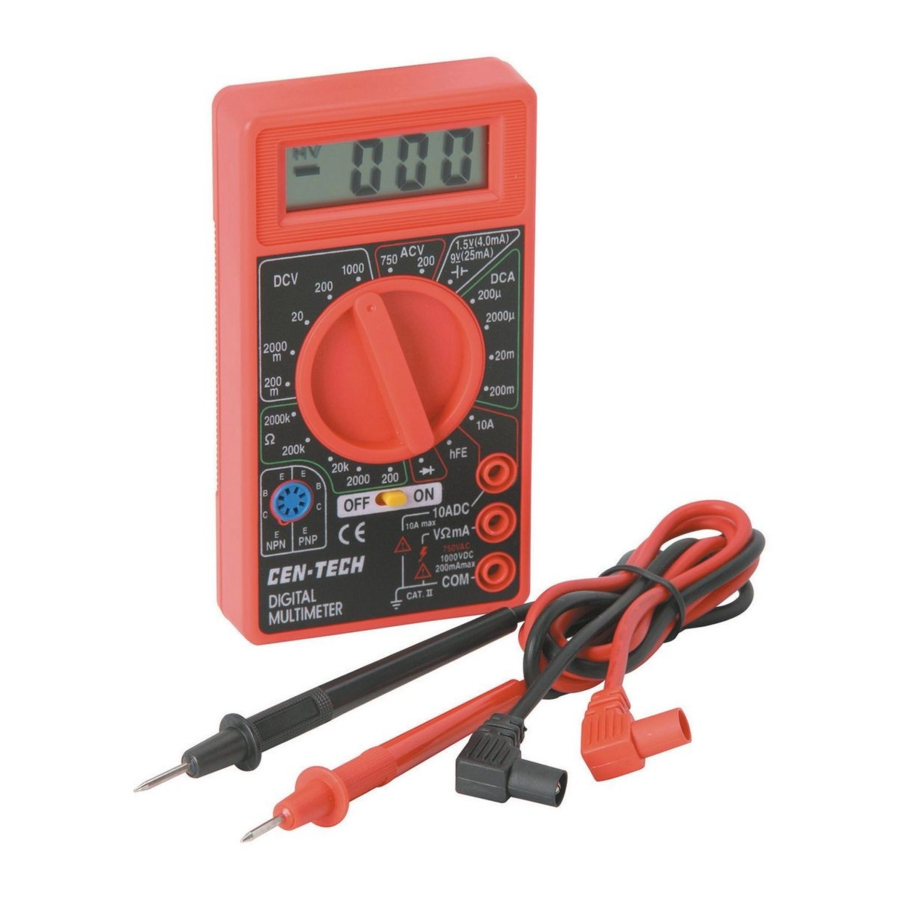
The Cen-Tech multimeter has several features. It includes a digital display, probes, and function selection dial. The display shows your measurements clearly. The probes connect to the circuit you are testing. The dial lets you choose what you want to measure.
Start by examining the multimeter’s front panel. Notice the symbols around the dial. Each symbol represents a different function. Common symbols include V for voltage, A for current, and Ω for resistance.
Setting Up The Multimeter
First, ensure the multimeter’s battery is working. Open the back cover to check or replace the battery. Next, connect the probes to the multimeter. Insert the black probe into the COM port. The red probe goes into the VΩmA port for most tests.
Turn the dial to select the measurement type. For instance, turn it to V for voltage. Make sure the dial is set correctly. Incorrect settings may give wrong readings.
Once set, you’re ready to test circuits. Ensure the device is off before connecting probes. This prevents damage and provides accurate readings.
Credit: www.manualslib.com
Basic Functions
The Cen-Tech Digital Multimeter is a versatile tool. It helps with basic electrical measurements. Understanding its functions is key. This device is easy to use. It measures voltage, current, and resistance. Let’s explore its basic functions.
Measuring Voltage
First, turn the dial to the voltage setting. Ensure the multimeter is set to the correct range. Use the probes to touch the circuit. The red probe goes to the positive side. The black probe connects to the negative side. Read the voltage on the display. It’s that simple.
Checking Current
Switch the multimeter to the current mode. Ensure the device is off before connecting. Place the probes in series with the circuit. This allows current to flow through the multimeter. Read the current value displayed. Always start with the highest range. Adjust if needed.
Testing Resistance
Turn the dial to the resistance setting. This is usually marked with an ohm symbol. Connect the probes to the component. Ensure the circuit is not powered. A reading will appear on the screen. It shows the resistance in ohms. Understanding resistance helps in troubleshooting circuits.
Advanced Features
The Cen-Tech Digital Multimeter is a handy tool for electrical tasks. It offers advanced features that enhance precision and versatility. These features make it perfect for those who need detailed measurements. Let’s dive into its advanced functions.
Using Continuity Mode
Continuity mode checks if a circuit is complete. This feature helps find broken wires or faulty connections. Activate it by turning the dial to the continuity symbol. Touch the probes to each end of the circuit. A beep indicates a complete path. This function saves time and ensures safe electrical work.
Exploring Capacitance Measurement
Capacitance measurement assesses a capacitor’s ability to store charge. Switch the multimeter to capacitance mode. Connect the probes to the capacitor terminals. Read the value displayed on the screen. This feature is essential for testing capacitors in electronics. Accurate readings ensure devices operate efficiently.
Temperature Sensing
Temperature sensing adds value to your multimeter. It measures ambient temperature or specific components. Attach the temperature probe to the multimeter. Place the probe where you need a reading. The temperature appears on the display. This function is useful for thermal testing and maintenance.
Safety Precautions
Using a Cen-Tech Digital Multimeter requires attention to safety. Following the right steps ensures your safety. Proper use prevents accidents and equipment damage.
Safety involves understanding the device and its risks. Protect yourself by knowing how to handle it correctly.
Avoiding Common Mistakes
Incorrect settings lead to inaccurate readings. Always check the multimeter settings before use. Set the correct mode for your measurement.
Never use a damaged multimeter. Inspect for cracks or broken parts. Damaged equipment poses risk.
Wrong probe placement can cause errors. Ensure probes are placed correctly in the circuit.
Protective Measures
Wear protective gear while using the multimeter. Gloves protect against electric shocks. Safety goggles shield your eyes from sparks.
Avoid working in wet conditions. Water increases the risk of electric shock. Keep the multimeter dry.
Ensure proper grounding. Grounding prevents electric currents from harming you. Always check the grounding of your work area.
Maintenance Tips
Maintaining your Cen-Tech Digital Multimeter ensures its accuracy and longevity. Regular care prevents common issues and keeps the device in prime condition. Follow simple steps to keep your multimeter functioning well. Below are essential maintenance tips.
Cleaning The Multimeter
Dust and dirt can affect the multimeter’s performance. Use a soft cloth to wipe the exterior. Avoid using water directly on the device. For stubborn grime, use a mild cleaner. Ensure the device is turned off before cleaning.
Inspect the probes for residue. Clean them with a dry cloth regularly. Check the display screen for smudges. Wipe it gently to maintain visibility. Store the multimeter in a dust-free place.
Battery Replacement
A weak battery leads to inaccurate readings. Replace the battery when the display dims. Check the battery compartment for corrosion. Clean it if necessary before inserting a new battery.
Use the recommended battery type. This ensures optimal performance. Dispose of old batteries properly. Store spare batteries in a cool, dry place.

Credit: www.youtube.com
Troubleshooting
Troubleshooting electrical issues can be tricky. A Cen-Tech Digital Multimeter helps make it easier. It identifies problems in circuits and devices.
This tool is reliable for diagnosing errors and checking calibration needs. Let’s explore how it can help solve common issues.
Diagnosing Errors
Use the multimeter to find faults in circuits. Set the dial to the correct measurement type. Check voltage, resistance, or current as needed.
Connect the probes to the circuit. Observe the readings on the display. Compare them with expected values. This helps pinpoint errors quickly.
If readings are off, there may be a component failure. Replace faulty components to fix the issue.
Calibration Needs
Calibration ensures accurate readings. Over time, multimeters may drift from accuracy. Regular checks are essential.
Test the multimeter with a known standard. Use a calibration device or a reference circuit. Adjust the multimeter settings if necessary.
Keep the multimeter well-maintained. This ensures long-term accuracy and reliability.

Credit: www.allaboutcircuits.com
Frequently Asked Questions
How To Check Voltage On A Cen Tech Digital Multimeter?
Turn the dial to the V (voltage) setting. Connect the red probe to the positive terminal and the black probe to the negative terminal. Read the voltage on the display. Ensure the probes are securely connected for accurate readings.
How To Use A Digital Multimeter Step By Step?
Turn the multimeter on. Select the measurement type: voltage, current, or resistance. Connect the probes: red for positive, black for negative. Place probes on the component or circuit. Read the display for the measurement. Adjust settings if needed. Ensure safety precautions are followed throughout the process.
How To Use A Cen Tech Digital Multimeter To Check Ohms?
Turn the multimeter dial to the Ω (ohms) symbol. Connect the red probe to the VΩmA port and the black probe to the COM port. Touch the probes to the component’s ends. Read the resistance value on the display. Ensure the component is disconnected from any power source.
What Settings Should I Use On My Digital Multimeter?
Set your digital multimeter to the correct measurement mode: voltage, current, or resistance. Choose AC or DC based on the circuit. Select an appropriate range for accuracy. Always start with the highest range to avoid damage. Ensure probes are correctly connected: black in COM, red in VΩmA.
Conclusion
Using a Cen-Tech digital multimeter can be simple and rewarding. Start by understanding its basic functions. Practice measuring voltage, current, and resistance. Safety should always be your priority. Handle the probes carefully. Read the manual for detailed instructions. Regularly check your multimeter’s battery.
Keep it in a safe place to avoid damage. Use it to test electrical devices at home. This tool can help you troubleshoot common problems. Remember, practice makes perfect. With time, your confidence will grow. Soon, you will become skilled at using your multimeter effectively.
Happy measuring!