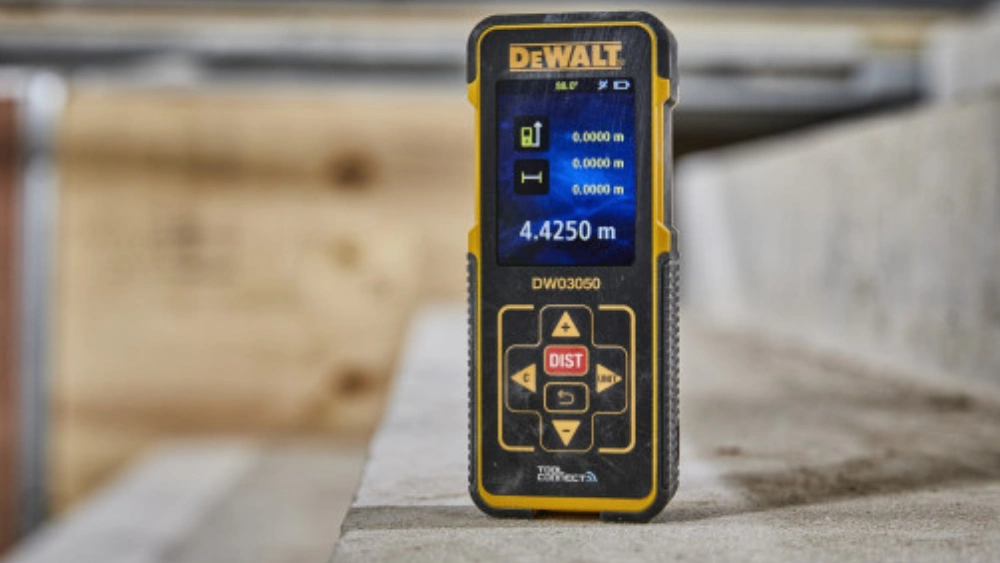
Are you tired of fumbling with tape measures, struggling to get accurate readings? The Dewalt DW03050 Laser Distance Measurer might just be the tool you need.
Imagine measuring distances with pinpoint accuracy, all at the push of a button. This handy device is designed to make your life easier and your projects more efficient. Whether you’re a seasoned professional or a DIY enthusiast, understanding how to use this tool can save you time, effort, and frustration.
You’ll discover simple steps and practical tips to get the most out of your Dewalt DW03050. Ready to transform the way you measure? Let’s dive in and unlock the secrets to precision and efficiency.
Setting Up The Dewalt Dw03050
Setting up the Dewalt Dw03050 is simple. Turn it on and select your measurement mode. Aim the laser, then press the button to get accurate readings. Ideal for quick and precise measurements.
Setting up the Dewalt DW03050 laser distance measurer is like setting the stage for precision and efficiency in your measuring tasks. Whether you’re a DIY enthusiast or a professional contractor, ensuring your device is ready to deliver accurate readings can make all the difference. Let’s walk through the steps of setting up this handy tool so you can measure distances with confidence and ease.Unboxing And Inspecting The Device
Start by carefully unboxing your Dewalt DW03050. Take a moment to inspect the device for any visible damage or missing parts. Is everything intact? Great, you’re off to a good start.Inserting The Batteries
Your laser distance measurer requires two AAA batteries to operate. Slide off the battery cover on the back of the device. Insert the batteries, ensuring the positive and negative ends are aligned correctly. Replace the cover securely.Powering On And Off
To turn on your Dewalt DW03050, press the power button located on the front panel. Once powered, a quick display check ensures all functions are operational. You can power off the device by pressing and holding the same button.Understanding The Display And Buttons
Familiarize yourself with the layout of the display and buttons. The screen shows important data like distance readings and battery status. Explore the buttons, noting functions like mode selection and unit conversion. Have you figured out what each button does yet?Setting The Measurement Units
Choose your preferred measurement units—meters, feet, or inches. Press the unit button until you see your chosen unit displayed. Customizing units ensures your measurements align with your project’s requirements.Calibrating The Device
The Dewalt DW03050 typically comes pre-calibrated. However, for peace of mind, consider a quick test measurement against a known distance. Is the reading accurate? This step ensures your device is ready for precise measurement tasks.Adjusting The Reference Point
Decide whether to measure from the front or back of the device. Adjust the reference point using the dedicated button. This flexibility allows you to adapt the tool to different measuring scenarios effortlessly.Testing The Device
Conduct a few test measurements in a controlled environment. Try measuring the length of a table or a room. Are the readings consistent and accurate? This practice helps you gain confidence in using the tool effectively. By setting up your Dewalt DW03050 properly, you’re not just preparing a tool—you’re preparing for success in your projects. Have you discovered any unique tips or tricks while setting up your device? Feel free to share your insights below.Effective Measurement Techniques
Effective measurement techniques are essential for accurate results. The Dewalt Dw03050 Laser Distance Measurer offers precision and ease. Understanding its features optimizes measurement tasks. This section explores practical methods to enhance your measuring experience.
Understanding The Laser Targeting System
Laser targeting helps pinpoint exact locations. Aim the device at the intended spot. Ensure there are no obstacles. This prevents incorrect readings. The laser beam travels in a straight line. Keep the device steady for precise targeting.
Ensuring Stable Positioning
Stability affects measurement accuracy. Hold the measurer firmly. Use both hands if necessary. A tripod can offer added support. Avoid shaking or movement. This reduces errors and enhances precision.
Utilizing Reference Points
Reference points guide your measurements. Start from a fixed location. This helps maintain consistency. Mark the starting point if needed. Repeat measurements from the same spot. This ensures reliable results.
Taking Multiple Measurements
Multiple measurements enhance accuracy. Measure at least twice for confirmation. Check for consistency in results. This verifies the data. If results vary, reassess the setup. Accurate measurements are crucial for success.
Adjusting For Environmental Factors
Environment influences measurement. Consider lighting conditions. Bright light affects laser visibility. Measure during optimal lighting. Ensure no reflective surfaces nearby. These can distort the laser path. Adjust accordingly for accurate readings.
Maintenance And Care Tips
Maintaining your Dewalt DW03050 Laser Distance Measurer is crucial for ensuring its longevity and accuracy. Proper care will save you from potential headaches and costly repairs. Let’s dive into some practical tips to keep your tool in top shape.
Cleaning Your Laser Distance Measurer
Regular cleaning prevents dust and debris from affecting the laser’s performance. Use a soft, dry cloth to gently wipe down the exterior. Avoid using any liquids or harsh chemicals, as they can damage the sensitive components.
Protecting The Lens
The lens is the heart of your laser measurer. Ensure it’s free from scratches by storing the device in its protective case when not in use. If you accidentally touch the lens, clean it immediately with a microfiber cloth to avoid smudges.
Battery Care
Extend your battery life by removing them if you won’t use the tool for a while. Store the batteries in a cool, dry place. Regularly check for any signs of corrosion and replace them as needed. A simple check can save you from unexpected failures.
Storage Tips
Keep your laser measurer in a dry, dust-free environment. Extreme temperatures can affect its accuracy. Consider a toolbox or dedicated drawer to avoid accidental knocks or falls. Where do you store yours?
Handling With Care
Always handle your tool gently. Dropping it can misalign the laser and affect measurements. Use the wrist strap provided to prevent accidental drops. It’s a small habit that can make a big difference.
By integrating these maintenance tips into your routine, you can ensure your Dewalt DW03050 remains reliable and accurate. What maintenance habits have you found most effective? Share your thoughts!
Frequently Asked Questions
How To Use Dewalt Laser Distance Measure?
Turn on the DeWalt laser measure. Aim at the target area. Press the button to capture distance. View measurement on the display. Adjust settings using the mode button for different measurements like area or volume.
What Is The Dewalt Laser Measure Dw03050?
The DeWalt laser measure DW03050 is a handheld tool for precise distance measurements. It features a range of up to 165 feet and provides accuracy within 1/16 inch. This device is ideal for construction, remodeling, and various measurement tasks, offering convenience and reliability in a compact form.
How To Use A Laser Distance Measurer?
Turn on the laser distance measurer. Aim at the target point. Press the measurement button. Read the distance on the display. Ensure a clear line of sight for accuracy.
How Accurate Is The Dewalt Atomic Laser?
The DeWalt atomic laser offers high precision with an accuracy of ±1/8 inch at 30 feet. It ensures reliable measurements for construction tasks, enhancing project efficiency and quality. This tool is favored by professionals for its dependable performance in various environments.
Conclusion
Mastering the Dewalt Dw03050 Laser Distance Measurer is simple. This tool boosts accuracy in your projects. Follow the steps for precise measurements every time. Practice makes perfect, so keep using it. The Dewalt Dw03050 is reliable for both small and large tasks.
Always check the battery before use. Keep the device clean for best results. Remember, safety is crucial. Avoid pointing the laser at eyes. Use it indoors or outdoors with ease. This device enhances efficiency, saving both time and effort. Enjoy more accurate measuring with the Dewalt Dw03050.




